Create Home Page
There are several templates for libraries and departments:
- Library Home, Arts, MSSA, Music, Divinity: All have a different Heading, Main Menus, Search block, Billboard Image, Menu, In focus news
- Bass; Uses the same Heading, adds Sub-section, and without In focus
- Home page for International Collections, Classic Library : Using "Collection Landing Page" to provide menu and content"
- East Asia Library, Fortunoff: First Preference author block replaced by other content
- Historical Sound Recordings: moves content block to Third Preference area
- Home page for Library IT, Microform: have Default Heading and Main Menu
- Preservation: Add highlight menu block in Sub-section region
- Giving to the Library: Different heading
- Home page for Digital Collections: Different Theme
Templates and Regions
With different blocks put in different regions will create different home pages by using Context configuration.
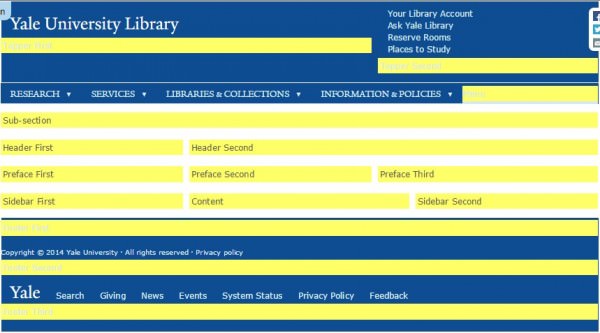

Custom Collection Landing Page for HSR
Create a Collection Landing Page > music/hsr
Structure > Context > international_collection > Add ~music/hsr to not using this context for the new pagae
Clone Contex > internationa_collection => historical_sound_recordings
- Node type > Remove the Conditions for "Collection Landing Page"
- Path > Give the path restriction to be "music/hsr"
- Blocks > Preface Third
- Remove "Field: field_find_link"
- Add delta_blocks => "Page title"
- Add system => "Main page content"
- Add "Library Hour" block to top of this region after create the block with PHP Code
- Structure > Blocks > Content > Configure the following
- Page title => Add "~music/hsr" to not have this block show in Content Area
- Main page content => Do the same step as above
Add the following iframe in the landing page to display library hour
<iframe height="60" scrolling="no" src="http://api.libcal.com/api_hours_today.php?iid=457&lid=400format=rss"></iframe>
OR can create a library hours block with PHP code, and style of "block-yul-hours highlight-block"
PHP Code<?php
$result = drupal_http_request('http://api.libcal.com/api_hours_today.php?iid=457&lid=405&format=html');
$content = $result->data;
print $content;?>
Sample Home Page : Giving to the Library
Disable Sitewide default title heading: Structure > Context > Scrolling down to "sitewide_default" > Edit > Conditions: Path, exclude this site "~development*
Create new Context "giving_to_library" for this site
- Create "giving_to_library_sub_site_name" block, with Block body:
"<h2 class="site-name"><a href="/development" title="Return to the Giving to the Library home page">Giving to the Library</a></h2>" and CSS class "sub-site-name" - Clone "sitewide_default" context, do the necessary change
- path: only "development*"
- Blocks: Change Blocks in "Topper First" region from "Site name" to "YUL Workmark" and "Giving to Library Sub-site Name". All others are keep same with Side wide defaul.
- Create proper menus and blocks as required
- See more detail at "Create Development Council Site".
Menu
Creatae Main Menu: Structure > Menus > Add Menu > Drag and drop to arrange the order
Create Menu block to using part of the Menu in Main menu by select propal parent menu
- Main Menu => home page Main menu with level 1 title link
- Research, Services, Libraries & Collections, Information & Policies (each one with it's own block) to Menu Region, also "YUL Main Menu"
- Places "Places Block" in "Sub-section" region, also as "Header" Menu
- Manin menu Home => A revised menu For "Research Block" at "Preface First" Region
- Yale Links => Home page footer menu
Top menu without page link:
Create a Menu with Custom Links it with URL as "javascript:voil(0)"
Expand Level 2 Keep level 1
Using default Menu block (was auto created when create new menu) instead of "Menu 2+"
References
Custom Blocks
AddThis for facebook, twitter, email: create a block with CSS class "addthis" and Block body:
<!-- AddThis Button BEGIN -->
<div class="addthis_toolbox addthis_floating_style addthis_16x16_style">
<a class="addthis_button_facebook_follow" addthis:userid="yalelibrary"></a>
<a class="addthis_button_twitter_follow" addthis:userid="yalelibrary"></a>
<a class="addthis_button_email"></a>
</div>
<script type="text/javascript">var addthis_config = {"data_track_addressbar":false};</script>
<script type="text/javascript" src="//s7.addthis.com/js/300/addthis_widget.js#pubid=ra-5034cdc446677019"></script>
<!-- AddThis Button END -->
Arts Search Area Links => Point to "Arts main Menu - Search Area" with CSS class of "search-area-links narrow-or-greater" to change the default search blocks at "Header First" Region
Using Library Theme - Testimonies Site
Need enable testimonies site to use library theme:
sites > all > themes > yul > yul.info + add this line "allowed_sites[] = testimonies.library.yale.edu"
Request Library Theme deploy to testimonies site (contact ITS Massaro, Vincent <vincent.massaro@yale.edu> and Pasko, Kimberly <kimberly.pasko@yale.edu>)
"Yale University Library" Theme should appear in "Appearance > Settings", set it to default, and start to work from here
Create 'YUL Wordmark' block
- Machine name: yul_wordmark
- Block Description: YUL Wordmark
- Block Body: <h2><a href="/" title="Yale University Library home page"><span class="yul-wordmark-yale">Yale </span>University Library</a></h2>
Create 'Menu
References
- YaleSite: Hiding your theme from other sites
Fortunoff Home Page
Create 'Fortunoff Sub-site name' Block
- Block description > 'Fortunoff Sub-site name'
- Block body: <h2 class="site-name"><a href="/testimonies" title="Return to Yale University Library Fortunoff Video Archive for Holocaust Testimonies">Fortunoff Video Archive for Holocaust Testimonies</a></h2> [Test format: Full HTML]
- Block Title Link Setting > Display Link
Create Context "fortunoff_sub" for sub page > Tag: YUL >
- Description : Header and footer, and other blocks, for path /testimonies*
- Condition > Path > testimonies*
- Blocks >
- Topper First : "YUL Wordmark" ; "Fortunoff Sub-site name"
- Topper Second : "Fortunoff Header"
- Menu : "Fortunoff Research Nav" ; "Fortunoff Services Nav" ; "Fortunoff Edit Program Nav" ; "Fortunoff Visit Nav" ; "Fortunoff About Archive Nav" ;
- Footer First: Footer
- Footer Links : Yale Links
Create Context "fortunoff" for home page > Tag : YUL
- Description : Home Page for Fortunoff Video Archive for Holocaust Testimonies
- Path : fortunoff => testimonies
- Block >
- Header First: YUL Orbis Search; YUL Finding Aids Search;
- Header Second: View: Random Billboard: Fortunoff Block;
- Preface First: Fortunoff Research Nav;
- Preface Second: Foutunoff Quick Links Nav;
- Preface Third: MSSA Hours; Fortunoff Ask Block;